Bartels Construction Solutions · USA
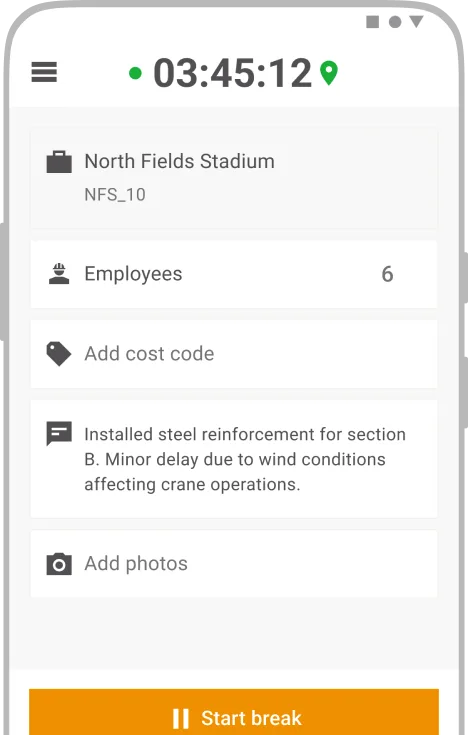
Pick the job, pick the people, clock in.
How a self-performing general contractor runs time for its concrete crews on CrewCenter, and why fewer clicks beat more features.
Bartels Construction is a US general contractor that self-performs about half of its work, most of it concrete, with some metal building erection and masonry on the side. The projects are commercial, with a share of industrial work. Bartels has been a Hilti customer for years, first with tools, then with ON!Track and Fieldwire, and since 2025 with CrewCenter for its field crews. Around 50 people work at Bartels, 40 of them on the concrete crew. We spoke with Xan Deaton, Vice President, and Thais Echols, Project Assistant, who is responsible for systems and processes and connects everything that happens in the office with the crews on site.
Too many tools to remember
Bartels didn't start with time tracking. It started with drawings. About three years ago the company was on a project management platform it found built for construction managers rather than contractors who pour their own concrete. A demo later, Fieldwire replaced it. That first switch opened the door to the rest of the Hilti software. “I think I found ON!Track next,” Xan Deaton says, “because we were getting too many tools for me to remember by myself.”
CrewCenter came last, when the concrete crew needed a timekeeping solution. At that point CrewCenter was barely available in the United States. Deaton had found it while it was still a European product and pushed to get it switched on, which made Bartels one of the first US companies to run it. He is relaxed about why he went looking: “I'm not really sure what made me do the digging. We've always been pretty heavy Hilti users. You've got a good reputation in the industry.”
Why they left an app they liked
Before CrewCenter, the concrete crew used a previous time-tracking app, and the office had no real complaint about it. Bartels switched anyway. Part of it was cost. Part of it was a long list of features nobody used. The bigger reason was the expectation that Hilti would connect its own products faster than a standalone vendor ever could.
One difference showed up on the crew's phones straight away. The old app leaned on live GPS tracking all day, which drained batteries. CrewCenter records location at clock in and clock out. “We want the geofences,” Deaton says, “but we're happy to have it ping on clock in and clock out instead of live tracking all day. That's a pretty big battery drain.”
How a day's time moves from the field to payroll
The workflow has layers, and each one is somebody's job. Foremen clock their crews in and out. Every worker can open the app and check their own hours. Superintendents go in daily and approve, making sure the hours sit on the right job. On Mondays, project managers approve what the superintendents have approved, and the week goes to payroll. “The superintendents are making sure they're clocking in on the right job and at the right hours,” Thais Echols explains. “We love the new update. The list, the map, everything is there. It's one click to verify.”
That one click matters more than any feature list. Bartels' crews are mobile users who never see the desktop version. “The less clicks our guys in the field have to do, the easier,” Echols says. “What I'm looking at in the office is not what they're looking at in the field.”
The part that took a few months
The rollout was not a clean cutover, and Bartels is open about that. The first hurdle was reporting. The office needed the hours in a shape that fit how Bartels splits labor across projects and runs payroll, and that took a few iterations. The Hilti team stayed close through those months and worked with the office until the reports and the approval workflow matched the way the company actually works. On the field side, the work was getting crews into the habit of picking the right project and entering the right quantity, the same habit any crew has to build with any new tool.
The day-to-day rollout in the field, Bartels ran on its own. “We took it and we ran with it,” Deaton says. “The simplicity of CrewCenter was attractive. It's a simple pick the job, pick the people, clock in.”
What Bartels wants next
Projects created in Fieldwire now appear in CrewCenter, so nobody sets up a job twice. Bartels sees that as the start, not the finish. What the company wants is for labor data to flow between the Hilti tools it already uses, so that hours, site documentation and project information end up in one place without anyone entering them twice.
Behind that sits a simple idea about who should be good at what. “Our guys in the field are experts at their trade. Our folks in the office are experts at being project managers,” Deaton says. “My goal is for them not to be experts in Fieldwire or CrewCenter. I want that to be automatic, and they can go and do what they're good at.”
Would they recommend it?
“Yeah, we would,” Deaton says. “There's simplicity, and on the back end we have the information we need from the guys, including the geotag on clock ins and clock outs so the data is accurate. And I'm always looking at the opportunity of the integrations. Hilti gives us optimism that's coming.”